Overnight Invoice Matcher
Accounts payable clerks manually match purchase orders, delivery notes and invoices, wasting hours and stalling payments. Invoices matched overnight within the tolerances you set, with every exception waiting in a review queue.
01The offer
For finance leads at mid-market importers, wholesalers or manufacturers, turn purchase orders, delivery notes and supplier invoices into an auto-matched payment queue with a highlighted exception list. Address the recurring problem: manual three-way matching consumes a finance week and delays payments. The value hypothesis is a faster, quieter accounts payable process with fewer errors; the pilot must prove it on real supplier data.
- For
- Finance leads at mid-market importers, wholesalers or manufacturers
- Takes in
- Purchase orders, delivery notes, supplier invoices, ERP access
- Delivers
- Auto-matched payment queue, exception list with highlighted variances, audit log
- Message
- Stop spending a week on three-way matching; let exceptions be the only thing you see in the morning.
- Lead magnet
- A free pilot matching one supplier's transactions for a month, with a report on time saved.
02How it works
- Ingest purchase orders, delivery notes and invoices from email and ERP
- Extract line items, quantities, unit prices and totals
- Match across three documents with configurable tolerances
- Post matched sets for payment approval
- Flag exceptions with specific discrepancies
- Log all actions with timestamps for audit
Workflow
Connect ERP and inbox, pull documents nightly, parse line data, run matching engine, review exceptions, approve matched sets, and schedule payments. Start with purchase orders, delivery notes and supplier invoices and finish with an approved payment queue and exception list.
AI and people
Use document parsing models to extract line-level data from unstructured layouts, and a matching engine to compare quantities and prices. A human checks all exceptions and spot-checks matched sets before payment approval.
Screens
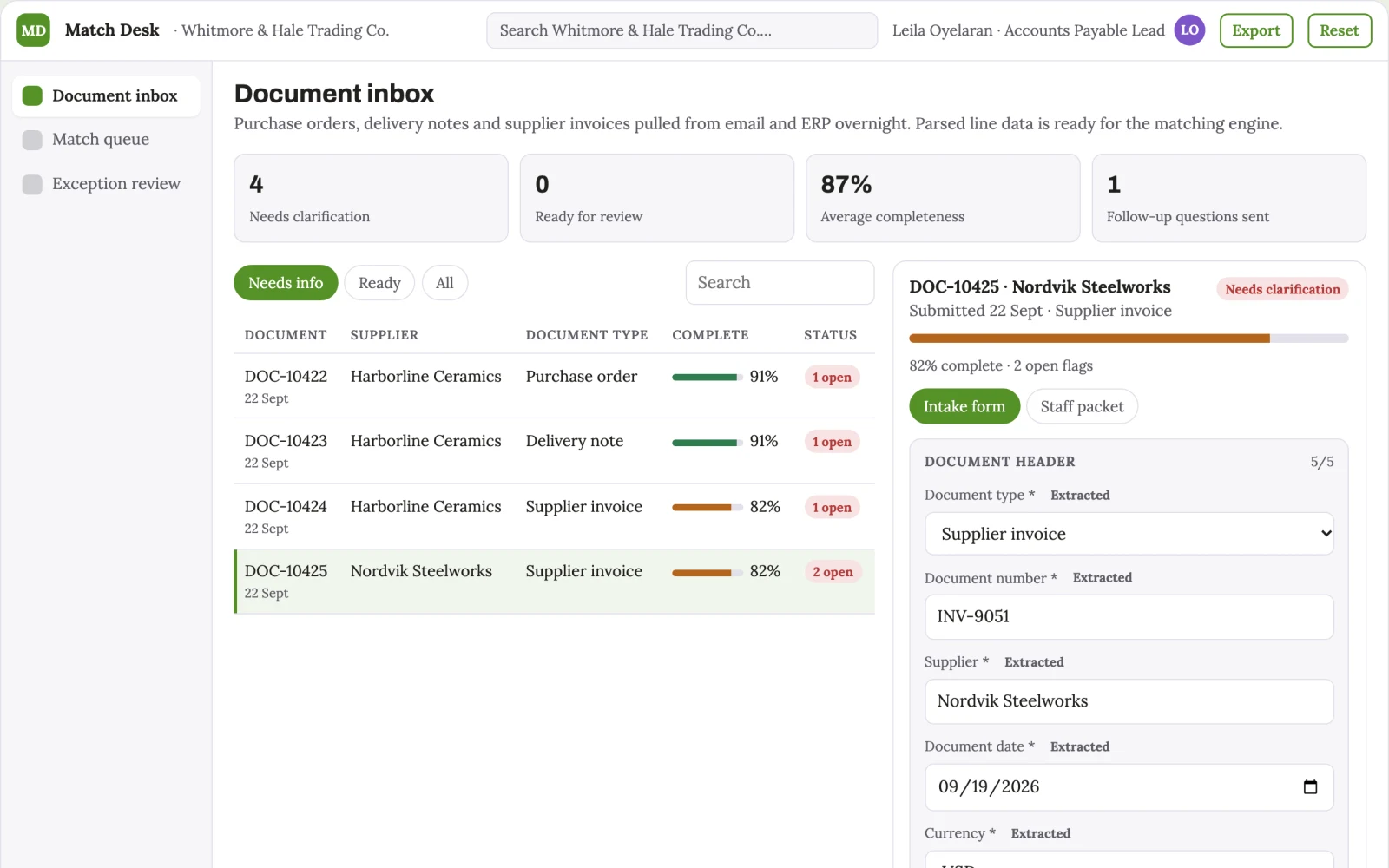
Key screens: Document inbox, match queue, exception review. Use a dashboard for daily status, a list view of matched sets with timestamps, and a detail panel showing line-level comparisons. Flag variances with colour and attach source documents. Allow filters by supplier, date or tolerance breach. In this product, the first view is document inbox, followed by match queue and exception review.
Admin
User roles for clerk and approver, document versions, tolerance settings, approval states, audit trail of all matches and reviews, and access controls for sensitive supplier data.
03Market gap
Alternatives buyers use today
Spreadsheets, shared inboxes and manual comparison; this differs by automating the parsing and matching overnight, leaving only exceptions for humans.
Where this wins
The more supplier documents processed, the better the parsing models adapt to real-world layouts and the more tuned the tolerance rules become, creating a data moat.
04Why now
Finance teams are adopting AI for exactly this kind of repeatable work, and the cost of language and vision models has dropped far enough that a narrow, reviewed workflow pays back quickly. The buyer already feels the problem: accounts payable clerks manually match purchase orders, delivery notes and invoices, wasting hours and stalling payments.
05Proof & signals
Channels where buyers gather: LinkedIn, finance webinars, industry conferences, direct outreach to finance leads.. Metrics that prove it works: Percentage of transactions auto-matched without exception, and hours saved per week in accounts payable..
Paid pilot
Run a paid pilot with one supplier for a month, measure baseline manual hours versus automated hours, and decide on scaling based on accuracy and time saved.
06Execution plan
MVP
One supplier, one ERP connector, document parsing and matching modules, manual review queue for exceptions.
First 30 days
Week 1: Set up ERP connector and email ingestion. Week 2: Build parsing and matching engine for one supplier. Week 3: Test on real documents and tune tolerances. Week 4: Deliver exception queue and review with client.
After the pilot
After the paid pilot, automate tolerance adjustments, add multi-currency support, integrate with more ERPs, and auto-route matched sets to payment systems.
Retention
Ongoing subscription with monthly tuning and support; as more suppliers are added, switching costs rise.
Integrations
ERP systems like SAP or NetSuite, email inboxes, freight portals, PDF storage folders.
07Investment and running costs
| Phase | Scope | Time | Budget |
|---|---|---|---|
| MVP | One buyer segment, one recurring use case. Manual review in the loop. | 6 days | $10,500 |
| Paid pilot | Accounts, roles, review states, audit trail and the first integration, hardened for two to three paying pilot customers. | 7 days | $13,000 |
| Full product | Self-serve onboarding, billing, monitoring and the wider integration set. | 3 weeks | $18,500 |
| Total | $42,000 | ||
| Running | Hosting | AI usage | Total a month |
|---|---|---|---|
| MVP and paid pilot (about 3 customers) | $50–$100 | $40–$90 | $90–$190 |
| Full product (about 50 customers) | $190–$380 | $280–$560 | $470–$940 |
Revenue model to test
Test pricing at $1,500 per month per client, with a setup fee of $5,000.
Cost drivers
Document parsing API usage, ERP integration development, cloud hosting, and ongoing model tuning.
Safeguards
Limit access to finance roles only, require approval for payments, log all actions, and never auto-pay without human sign-off. It must not override tolerance thresholds without explicit approval.
Take it further
Solution blueprint, rewritten from an earlier Nexibeo concept. Demand, pricing, build scope and integrations are working assumptions, not verified market findings. The MVP and the paid pilot exist to confirm them for your business before the larger build.