Solution Database / Healthcare
Referral Triage and Routing
Inbound patient referrals are hand-sorted and often miss urgency, causing delays and wrong inboxes. The system learns each clinic's specific queue structure and referral language, so it routes more accurately over time than a generic inbox filter.
01The offer
For operations leads at multi-disciplinary clinics and allied health networks, turn inbound referral emails, portal submissions and faxes into structured summaries with a suggested clinical queue and urgency flag. Address the recurring problem: hand-sorting is slow, inconsistent and a single point of failure, with urgent cases sometimes sitting unseen for days.
- For
- Operations leads at multi-disciplinary clinics and allied health networks
- Takes in
- Inbound referral emails, portal submissions and faxes
- Delivers
- Structured referral summaries with suggested queue and urgency flag
- Message
- Stop hand-sorting referrals: let AI route each case to the right clinician and flag urgent ones instantly.
- Lead magnet
- A free trial where you forward 20 real referrals and receive a structured summary with suggested queue and urgency for each.
02How it works
- Extract patient demographics, reason for referral and provider notes from email, portal or fax
- Classify the case into a predefined clinical queue
- Assign an urgency flag based on keywords and phrases
- Route routine referrals to the correct clinician's task list
- Push urgent referrals to the top with a notification to the on-call clinician
- Log all routing decisions and overrides for audit
Workflow
Referral arrives, system reads text and attachments, extracts structured fields, classifies queue, assigns urgency, routes to clinician or flags urgent, and logs the decision. Start with inbound referral emails, portal submissions and faxes and finish with structured summaries, suggested queue and urgency flag.
AI and people
Use language models to read referral text and attachments, extract demographics and reason for referral, and classify queue and urgency. A clinician reviews all high-urgency flags within a short window and audits a sample of routine referrals to catch edge cases before anything is used.
Screens
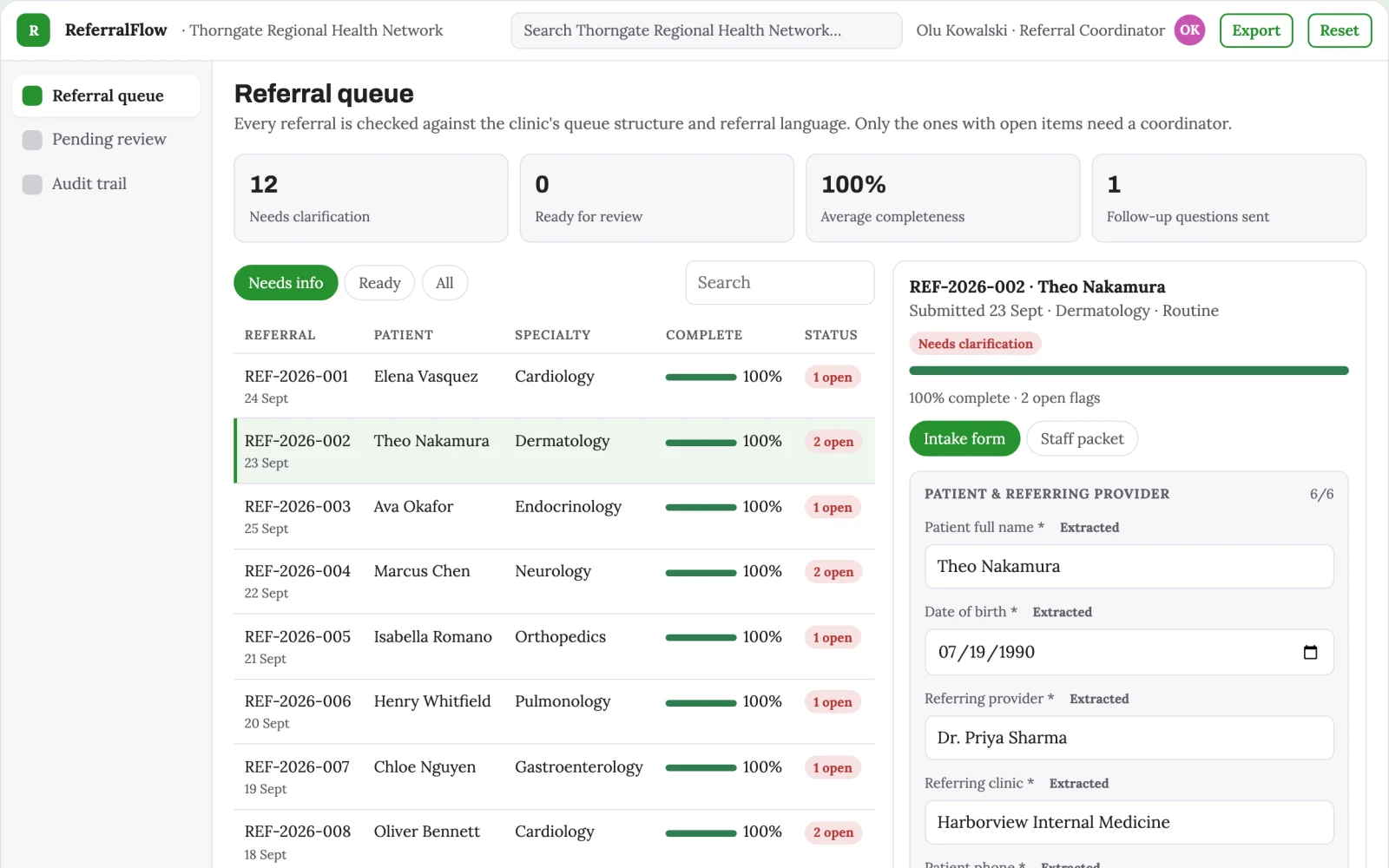
Key screens: Inbox monitor, referral summary, queue board. Use a central inbox feed showing incoming referrals with a status badge, a detail panel for the extracted summary and original document, and a queue board showing each clinician's task list with urgent items pinned to the top. Let users open a referral to review the AI's extraction and override the queue or urgency. Display routed, pending and flagged states. In this product, the first view is inbox monitor, followed by referral summary and queue board.
Admin
User roles for intake coordinators and clinicians, queue assignments, urgency overrides, audit trail of routing decisions, and version history of referral records.
03Market gap
Alternatives buyers use today
Receptionists and intake coordinators manually reading and forwarding referrals, or generic email rules. This differs by automating the reading and classification step and by flagging urgency consistently.
Where this wins
The routing model is fine-tuned on each clinic's historical referrals and clinician preferences, creating a proprietary dataset that improves with every case and is hard to replicate.
04Why now
Healthcare teams are adopting AI for exactly this kind of repeatable work, and the cost of language and vision models has dropped far enough that a narrow, reviewed workflow pays back quickly. The buyer already feels the problem: inbound patient referrals are hand-sorted and often miss urgency, causing delays and wrong inboxes.
05Proof & signals
Channels where buyers gather: Healthcare operations conferences, allied health association newsletters, and direct outreach to clinic managers.. Metrics that prove it works: Two measurable outcomes: average time from referral arrival to clinician task list, and percentage of urgent referrals flagged within one hour..
Paid pilot
A paid pilot with one clinic processing 15 referrals a day for 30 days. Baseline is current manual routing time and missed urgency rate. Decision to continue is a 50% reduction in routing time and zero urgent referrals missed.
06Execution plan
MVP
One buyer: a single multi-disciplinary clinic. One use case: email referrals only. First two modules: extraction and queue assignment. Manual review of every referral by a coordinator before it is routed.
First 30 days
Week 1: Build the email ingestion and extraction pipeline. Week 2: Develop the queue classification and urgency flagging logic. Week 3: Create the inbox monitor and queue board interface. Week 4: Run a manual review pilot with one clinic and refine routing accuracy.
After the pilot
After the paid pilot, automate routine routing without manual review, add portal and fax ingestion, and introduce escalation rules for repeated urgent flags.
Retention
The system keeps earning through a monthly subscription, with ongoing value from improved routing accuracy and reduced coordinator workload. Add a quarterly review of routing decisions to refine the model.
Integrations
Start with a monitored email inbox, then add a secure portal upload and fax-to-email gateway. Later connect to practice management systems for task creation.
07Investment and running costs
| Phase | Scope | Time | Budget |
|---|---|---|---|
| MVP | One buyer segment, one recurring use case; first modules: extraction and queue assignment. Manual review in the loop. | 6 days | $10,000 |
| Paid pilot | Accounts, roles, review states, audit trail and the first integration, hardened for two to three paying pilot customers. | 7 days | $13,000 |
| Full product | Self-serve onboarding, billing, monitoring and the wider integration set. | 2 weeks | $17,500 |
| Total | $40,500 | ||
| Running | Hosting | AI usage | Total a month |
|---|---|---|---|
| MVP and paid pilot (about 3 customers) | $50–$100 | $40–$90 | $90–$190 |
| Full product (about 50 customers) | $190–$380 | $280–$560 | $470–$940 |
Revenue model to test
Test at USD 300 per month per clinic, with a setup fee of USD 1,500 for initial queue configuration and model tuning.
Cost drivers
Main delivery costs are language model API usage per referral, secure document storage, and a clinician's time for the review window during the pilot.
Safeguards
Limit AI to suggesting queue and urgency, never making final routing decisions without a human override. Require clinician review of all high-urgency flags. Restrict access to authorised staff only. Must not access patient records beyond the referral content and must not share data outside the clinic's secure environment.
Take it further
Solution blueprint, rewritten from an earlier Nexibeo concept. Demand, pricing, build scope and integrations are working assumptions, not verified market findings. The MVP and the paid pilot exist to confirm them for your business before the larger build.