Mira Learning Worlds
One-size-fits-all lessons lose the child before anything sticks. The tutor builds the entire learning world around one child's question in seconds, which no static library of lesson apps can match.
01The offer
For homeschooling parents and teachers at small private schools, turn subject goals, a child's questions and session progress data into adaptive 3D learning scenes and a mastery summary. Address the recurring problem: one-size-fits-all lessons lose the child before anything sticks. The value hypothesis is a more complete, reviewable deliverable with less repeated preparation; the pilot must establish whether that benefit is real.
- For
- Homeschooling parents and teachers at small private schools
- Takes in
- Subject lists, learning goals, age and language preferences, and session progress data
- Delivers
- Adaptive 3D learning scenes, session mastery summary and a two-sentence voice note per session
- Message
- A patient tutor who builds a new world around whatever your child asks, and tells you in two sentences whether it worked.
- Lead magnet
- A free fraction pizza kitchen scene families can run on a tablet in one ten-minute session, with the AI-generated summary included.
02How it works
- Generate a themed 3D scene for the day's topic in seconds
- Adapt difficulty and examples from pauses and choices
- Answer why questions with age-appropriate explanations
- Introduce story characters to re-engage a distracted learner
- Log mastery and avoidance per concept
- Deliver a two-sentence voice note to the parent after each session
Workflow
Parent sets subjects and goals, child starts a session, Mira asks what the child is curious about, the AI generates a themed world with interactive objects, the child explores and solves puzzles, the AI logs mastery signals and drafts a summary, the guardian reviews the summary and approves the next session, and finish with approved session notes. Start with subject goals and progress data and finish with adaptive 3D learning scenes and a mastery summary.
AI and people
A language model interprets the child's questions, plans the scene structure and adapts difficulty, with voice synthesis giving the tutor a natural presence, and image or 3D generation building themed environments. A curated knowledge base limits what the tutor draws on. A parent or teacher reviews each session log and approves the next difficulty level before it is offered.
Screens
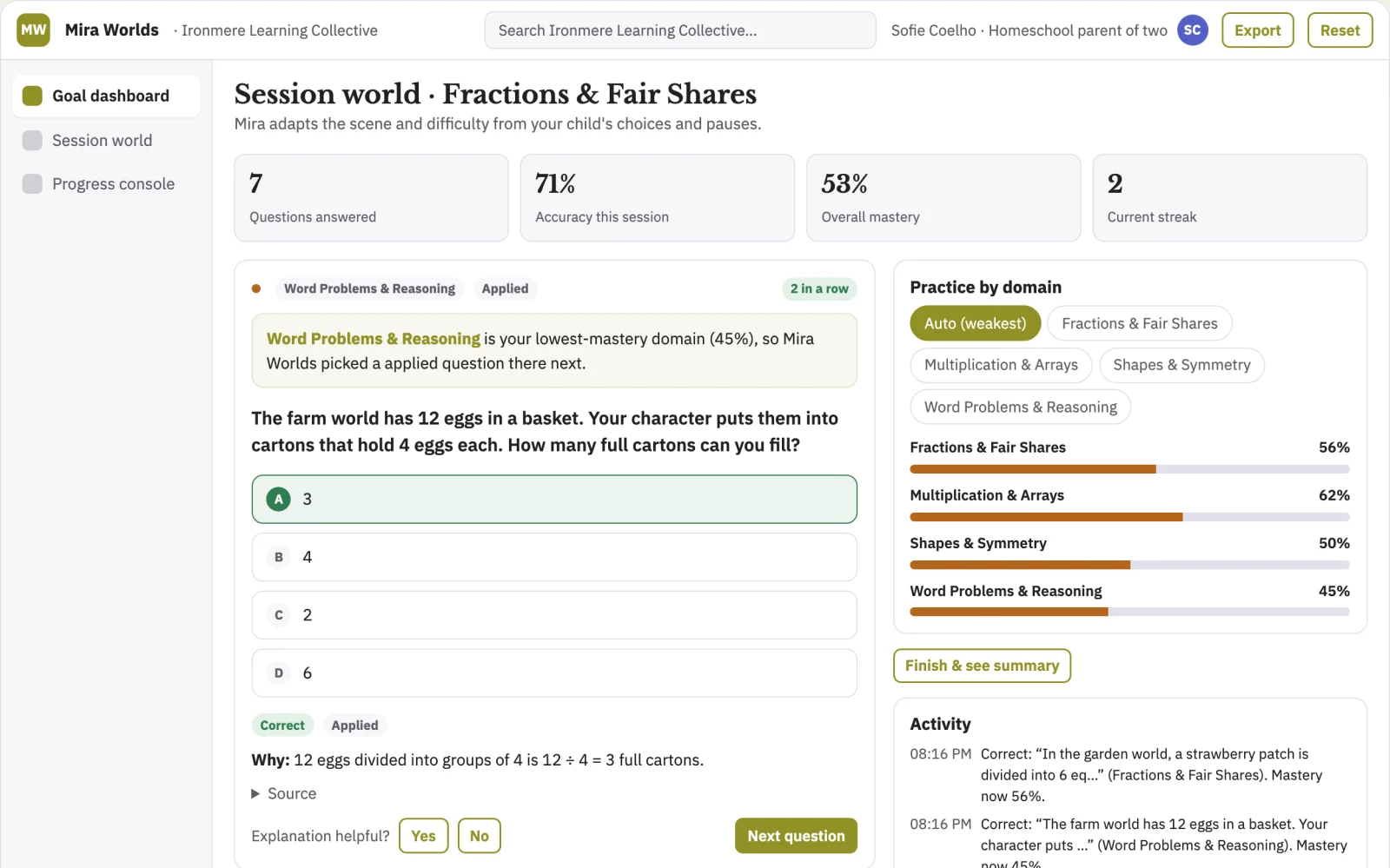
Key screens: goal dashboard, session world, progress console. The parent dashboard is a simple grid of subjects, weekly goals and current difficulty. The session world is the live scene view with a side panel of topic choices, touchable objects and puzzles. The progress console shows what was mastered, what was skipped, and a two-sentence voice summary per session. Let users switch between learner view and observer view, compare past sessions side by side, and mark scenes as reviewed, paused or approved. In this product, the first view is goal dashboard, followed by session world and progress console.
Admin
Parent and teacher accounts, child profiles with age settings, session versions, difficulty approval states, guardian review log, content filter audit trail and a record of scenes generated per account.
03Market gap
Alternatives buyers use today
Static lesson apps, educational videos and worksheet packs, which cannot sense when a child has disengaged. This product adapts the scene mid-session and reports back to the parent in plain language.
Where this wins
Every session logs which examples, characters and difficulty steps hold attention, so the adaptation rules improve with each child and the scene library compounds; a competitor starting fresh has no usage history to learn from.
04Why now
Education teams are adopting AI for exactly this kind of repeatable work, and the cost of language and vision models has dropped far enough that a narrow, reviewed workflow pays back quickly. Rising compliance and audit expectations make a documented, reviewable process worth more than an ad hoc one. The buyer already feels the problem: one-size-fits-all lessons lose the child before anything sticks.
05Proof & signals
Channels where buyers gather: Homeschooling communities and forums, VR family groups, private school networks and education conferences, and teacher recommendation groups.. Metrics that prove it works: Average minutes of focused engagement per session, and improvement in topic assessment scores between pre-test and post-test..
Paid pilot
Ten families use the fractions module for four weeks with a baseline of current lesson time on task and a pre-test of fraction understanding. The decision: if session time on task and pre-test to post-test gains beat baseline by the agreed margin, convert to the 29 USD monthly plan and open a school pilot.
06Execution plan
MVP
One buyer: homeschooling parents. One use case: fractions. First two modules: a pizza kitchen fraction scene and a measurement scene, both generated for tablet screens without a headset, with every AI summary manually checked before release to the ten test families.
First 30 days
Week 1: build the fractions module with two tablet scenes and the parent dashboard. Week 2: recruit ten homeschooling families and set baselines for attention and concept mastery. Week 3: run daily sessions, collect pause and mastery logs, and manually review every voice note. Week 4: analyse usage, fix the weakest scenes, and present the pilot findings with a school licence proposal.
After the pilot
After the paid pilot, automate scene generation for full topic lists, automate difficulty adjustments from logged pauses, automate voice note drafting with sample checks, and open a teacher dashboard for class-level insight.
Retention
Ongoing monthly subscription with new scenes added to each subject, difficulty levels approved by parents each term, and school licences renewed annually with a term-by-term teacher dashboard.
Integrations
Start simple: roster import for schools via CSV, calendar reminders, and export of mastery summaries as PDF. Later, Google Classroom and SIS gradebook connections.
07Investment and running costs
| Phase | Scope | Time | Budget |
|---|---|---|---|
| MVP | One buyer segment, one recurring use case; first modules: a pizza kitchen fraction scene and a measurement scene, both generated for tablet screens without a headset, with every AI summary manually checked before release to the ten test families. Manual review in the loop. | 5 days | $10,000 |
| Paid pilot | Accounts, roles, review states, audit trail and the first integration, hardened for two to three paying pilot customers. | 6 days | $12,500 |
| Full product | Self-serve onboarding, billing, monitoring and the wider integration set. | 2 weeks | $17,000 |
| Total | $39,500 | ||
| Running | Hosting | AI usage | Total a month |
|---|---|---|---|
| MVP and paid pilot (about 3 customers) | $30–$60 | $50–$110 | $80–$170 |
| Full product (about 50 customers) | $110–$210 | $420–$840 | $530–$1,050 |
Revenue model to test
Test at 29 USD per month per child for families, and an annual school licence at 15 USD per child per month with a teacher dashboard, as a hypothesis to validate in the pilot.
Cost drivers
Inference and 3D generation compute per session, voice synthesis, content moderation review, tablet and headset device testing, and ongoing curation of the knowledge base.
Safeguards
Tight content filter and a narrow curated knowledge base, no unsafe content, no medical or diagnostic claims, age-appropriate language limits, parent approval before each new difficulty tier, no headset features for children under an agreed minimum age, no unreviewed open-ended web answers, and a full audit trail of every scene generated and every summary sent.
Take it further
Solution blueprint, rewritten from an earlier Nexibeo concept. Demand, pricing, build scope and integrations are working assumptions, not verified market findings. The MVP and the paid pilot exist to confirm them for your business before the larger build.